Fitxer:Rosenbrock function.svg
Salta a la navegació
Salta a la cerca
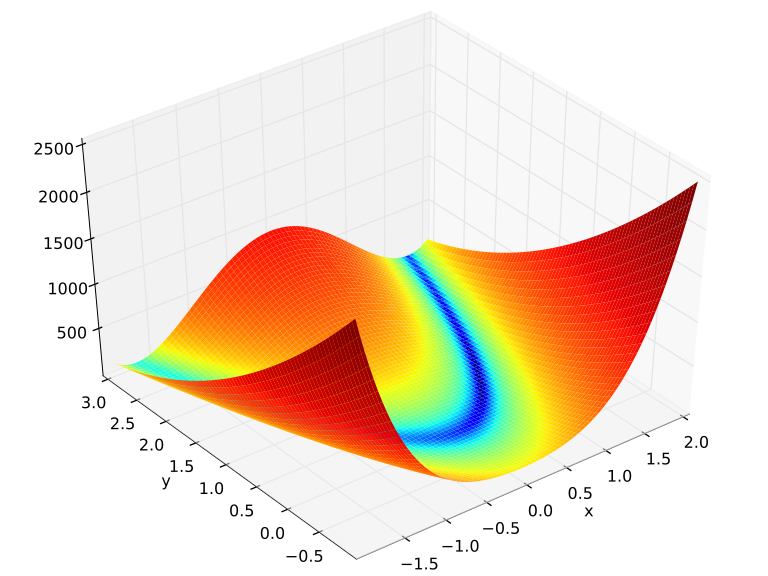
Mida d'aquesta previsualització PNG del fitxer SVG: 720 × 540 píxels. Altres resolucions: 320 × 240 píxels | 640 × 480 píxels | 1.024 × 768 píxels | 1.280 × 960 píxels | 2.560 × 1.920 píxels.
Fitxer original (fitxer SVG, nominalment 720 × 540 píxels, mida del fitxer: 2,28 Mo)
Resum
| Descripció |
English: Rosenbrock function over . The Python code needs at least Matplotlib v0.99. The MATLAB/Octave code was tested with GNU Octave 4.2.2 and MATLAB R2016a.
Español: Funció de Rosenbrock definida sobre . |
| Data | |
| Font | Treball propi |
| Autor | Morn the Gorn |
| Python source | click to expand
from mpl_toolkits.mplot3d import Axes3D
from matplotlib.colors import LogNorm
import matplotlib.pyplot as plt
import numpy as np

fig = plt.figure()
ax = Axes3D(fig, azim=-128, elev=43)
s = .05
X = np.arange(-2, 2.+s, s)
Y = np.arange(-1, 3.+s, s)
X, Y = np.meshgrid(X, Y)
Z = (1.-X)**2 + 100.*(Y-X*X)**2
# ax.plot_surface(X, Y, Z, rstride=1, cstride=1, norm = LogNorm(),
#                 cmap="viridis")
# Without using `` linewidth=0, edgecolor='none' '', the code may produce a
# graph with wide black edges, which will make the surface look much darker
# than the one illustrated in the figure above.
ax.plot_surface(X, Y, Z, rstride=1, cstride=1, norm=LogNorm(),
                linewidth=0, edgecolor='none', cmap="viridis")

# Set the axis limits so that they are the same as in the figure above.
ax.set_xlim([-2, 2.0])
ax.set_ylim([-1, 3.0])
ax.set_zlim([0, 2500])

plt.xlabel("x")
plt.ylabel("y")
plt.savefig("Rosenbrock function.svg", bbox_inches="tight")

plt.show()
|
| MATLAB/Octave source | click to expand
clear all;
close all;
hfig = figure(1);

s = 0.05;
X = [-2 : s : 2+s];
Y = [-1 : s : 3+s];
[X, Y] = meshgrid(X, Y);
Z = (1-X).^2 + 100*(Y-X.^2).^2;

% Use log scale of Z for a batter usage of the color spectrum
minZ = min(Z(:));
maxZ = max(Z(:));
C = minZ + (maxZ-minZ).*log(1+Z-minZ)./log(1+maxZ-minZ);
% See
% http://stackoverflow.com/questions/5073865/how-to-color-surface-with-stronger-contrast
% for how to color a surface with a even stronger contrast.
% The method is as follows:
%C = Z;
%[~, index] = sort(C(:));
%C(index) = 1 : numel(index);

colormap(jet);
surf(X, Y, Z, C, 'EdgeColor', 'none', 'LineStyle', 'none');

axis([-2, 2, -1, 3, 0, 2500]);
xlabel('x', 'fontsize', 18);
ylabel('y', 'fontsize', 18);
zlabel('f', 'fontsize', 18);

% Note that the `-dsvg' option is only supported for Simulink systems
print(hfig, '-dsvg', 'rosenbrock');
% To produce eps and pdf, use the following code. Notice that `epstopdf' may not work on Windows.
print(hfig, '-depsc', 'rosenbrock');
system('epstopdf rosenbrock.eps');
|


Llicència

|
Jo, el titular del copyright d'aquesta obra, l'allibero al domini públic. Això s'aplica a tot el món. En alguns països això pot no ser legalment possible, en tal cas: Jo faig concessió a tothom del dret d'usar aquesta obra per a qualsevol propòsit, sense cap condició llevat d'aquelles requerides per la llei. |
Historial del fitxer
Cliqueu una data/hora per veure el fitxer tal com era aleshores.
| Data/hora | Miniatura | Dimensions | Usuari/a | Comentari | |
|---|---|---|---|---|---|
| actual | 02:19, 5 juny 2020 | | 720 × 540 (2,28 Mo) | wikimediacommons>Zhangzk | The original colour looks much better (Reverted to version as of 11:52, 6 April 2010 (UTC)) |
Ús del fitxer
La pàgina següent utilitza aquest fitxer:
